
















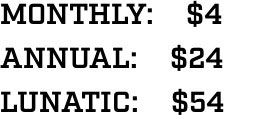































As of 9/1/2015
What can I access with my subscription?
Everything! You will have complete access to the full site, mobile site and the free app.
How do I upgrade my existing subscription?
Click MY ACCOUNT in the menu a top the site, then click UPGRADE and follow the steps.
Will my subscription renew automatically?
Yes, if you subscribe for the monthly or annual levels. The three-year subscriptions will not renew automatically, you will simply need to subscribe anew.
Can I purchase a gift subscription?
Yes, click GIFT SUBSCRIPTION from the drop down menu under SUBSCRIBE or the gift box on the left side of the page.
Will gift subscription renew automatically?
No, it will not.
How do I know when my subscription will expire or renew?
Click MY ACCOUNT from the menu atop the page to view the subscription details.
How do I log in?
On the LOGIN page, enter your username and password. Once logged in, you will see your subscription level highlighted and you can navigate the site by clinking any tab in the menu.
How do I reset my password?
On the LOGIN page, click ‘Lost password?’ and enter the email address associated with your account. An email from [email protected] will be sent to you that includes your username plus a link to change your password. Please check your junk/spam folder as well.
Where do I find/change my username?
Click MY ACCOUNT from the menu atop the page to view and change your profile info.
Why am I getting blocked from reading full columns?
You got logged out. See above.
Why can’t I read the site on my mobile device, but I can on my PC?
You need to log in anew on every device.
How do I change the email associated with my account?
Click MY ACCOUNT from the menu atop the page and click UPDATE INFO.
How do I create an avatar?
Click MY ACCOUNT from the menu atop the page and click ADD/CHANGE IMAGE. Follow the steps to create an account with Gravatar.
What if my question isn’t answered here?
Email us at [email protected]
What do I do if I didn’t get a response to my email in 24 hours?
Please check your Span/Junk folder and add Help@DKonPittsburghSports to your contacts.